How I Keep the Technical Stack Simple in 2026
This is the technical companion to Scaling Without Complexity in the Age of AI. That article argues that faster implementation does not make unnecessary complexity free. This one shows the deliberately small production setup I use to put that principle into practice.
This is not a universal architecture or a stack that every company should copy. It is a practical default for building and operating a product with fewer moving parts. The aim is to keep deployments, data, background work, and recovery understandable until real customer demand gives us a measured reason to add more.
The Architecture I Start With
My default architecture is deliberately uninteresting.
By “one application,” I mean one deployable monolith and one source of business logic. I do not necessarily mean one physical machine. A managed platform may run several instances, replace unhealthy ones, or scale the application automatically. That operational detail does not require the product to be divided into microservices.
The monolith can contain clear internal modules. Billing, accounts, reporting, and notifications do not need to become separate network services to have sensible boundaries. A function call is easier to understand, test, and change than a distributed contract. Split a service when its runtime, scaling, security, or ownership requirements are genuinely different—not because creating another repository has become easy.
This setup is enough for a surprising amount of software. One application, one database, one deployment path, one place to inspect logs, and one rollback procedure. If a real bottleneck eventually appears, the system is simple enough to measure before deciding what to separate.
Choosing the Application Platform
I choose a managed application platform before I choose a self-managed VPS. The goal is not to collect cloud services. It is to outsource undifferentiated operational work such as replacing failed processes, terminating TLS, connecting deployments to Git, and exposing logs.
The right option depends more on the team's existing environment than on a universal ranking.
| Platform | Strong fit | Trade-off to understand |
|---|---|---|
| AWS App Runner | Teams already using AWS, ECR, RDS, IAM, and VPCs | AWS networking and permissions can reintroduce complexity quickly |
| DigitalOcean App Platform | A conventional web application that should deploy directly from Git or a container | Fewer infrastructure primitives than AWS, which is often a benefit until a specialised need appears |
| Railway | Small teams optimising for fast setup and a simple developer experience | It is easy to add services, databases, and volumes until the project is no longer simple |
| Cloudflare Workers | Edge-first applications, supported full-stack frameworks, lightweight APIs, scheduled work, and queue consumers | The runtime is not identical to a traditional Node server; package and API compatibility still need verification |
AWS App Runner
AWS App Runner deploys from source code or a container image and manages the running web service. It supports automatic deployments and automatic scaling. A VPC connector can give the application access to private resources such as RDS, although AWS documents an initial provisioning delay when a new connector configuration is first used.
I choose App Runner when the rest of the company already lives in AWS. Keeping the application near RDS, IAM, CloudWatch, and existing organisational controls can be simpler than introducing a second provider. I avoid it when “we use AWS” becomes permission to assemble ten services for a problem one container could solve.
DigitalOcean App Platform
DigitalOcean App Platform is the most literal version of the setup: connect a Git repository or container image, configure the application, attach a database, and deploy. It handles the underlying infrastructure and supports vertical or horizontal scaling when it becomes necessary.
DigitalOcean can attach an application to a managed database as a trusted source, limiting which resources can reach it. That is a good example of useful managed complexity: the secure connection exists, but it does not require the product team to invent a networking platform.
Railway
Railway is attractive when speed of setup and developer experience matter most. It gives services public or private networking, variables, volumes, and database services without requiring the team to manage servers.
Its flexibility still needs discipline. Railway translates each service in a Compose file into a separate Railway service. That is convenient, but convenience is not an architectural reason to split the application. I start with one web service and add another only when the process has a genuinely different lifecycle.
Cloudflare Workers
Cloudflare Workers can host full-stack applications across supported frameworks, including Next.js. It can be an excellent default for applications designed around the Workers runtime, especially when global execution and tight integration with Cloudflare's platform matter.
It is not simply a conventional Node server deployed somewhere else. Cloudflare provides broad Node.js compatibility, but its documentation distinguishes full implementations from partial implementations and compatibility stubs. I verify the actual dependencies and workloads before choosing it for an existing Node monolith.
The simple choice is the platform that removes the most operational work while introducing the fewest new concepts to the team.
Use a Managed Database
I usually keep the application simple by refusing to self-host the most valuable state it owns.
A managed PostgreSQL database provides backups, maintenance workflows, metrics, secure connection options, and a path to high availability without turning database operations into a side job. DigitalOcean's managed database documentation is explicit that automatic failover alone is not the same as high availability: without a standby node, the primary remains a temporary single point of failure while it is replaced. That is a useful trade-off, not a reason to buy redundancy automatically.
Start with the smallest configuration that meets the actual recovery requirement. Add a standby when the cost of database downtime exceeds the cost of the extra node. Add read replicas when measured read traffic requires them. Do not pay for an imaginary scale problem, but do understand what failure looks like on the plan you selected.
Managed does not mean responsibility-free. The application team still owns schema design, indexes, migration safety, connection limits, retention, and restore testing. A backup that has never been restored is only a belief.
Restrict database access to trusted sources and use verified TLS where the provider supports it. DigitalOcean's PostgreSQL security guide distinguishes encrypted connections from connections that also verify server identity. That detail matters more than adding another fashionable database layer.
Keep DNS Boring Too
I use Cloudflare for DNS and proxy the public application through it. That gives me useful infrastructure without adding another system: static assets are cached closer to users, the origin receives less traffic, and Bot Fight Mode can challenge known automated traffic before it reaches the application.
I keep the configuration small: cache public assets, bypass personalised responses, and monitor bot protection for false positives. DNS should stay boring; the caching and protection around it are the valuable parts.
Add Workers Only for Different Work
Background work does not automatically justify a separate service. Sending an email after a request can begin as an in-process job. A scheduled maintenance task can begin as a command invoked by the platform. Keep business logic inside the monolith for as long as the lifecycle remains the same.
I create a separate worker application when the workload has a different operational requirement: it must run on a schedule, absorb bursts through a queue, retry independently, execute for much longer, or scale separately from web traffic.
Cloudflare's guidance makes the boundaries useful. Cron Triggers handle periodic jobs. Queues suit buffering, fan-out, and simple background jobs with retry behaviour. Workflows suit multi-step processes that must persist state and resume after failures or waits.
Even then, I keep the split narrow. The worker consumes a well-defined command and calls shared business logic or a small authenticated application API. It does not become a second implementation of the product domain.
When I Choose a VPS
A self-managed VPS can be the simplest runtime in the abstract: one machine, Docker, an application, and perhaps a reverse proxy. It can also be the cheapest option for stable workloads.
The complexity appears over time. Somebody must own operating-system security updates, SSH access, firewall rules, Docker updates, certificates, process supervision, disk usage, monitoring, backups, restore procedures, and recovery when an upgrade fails. None of those tasks is impossible. Together, they form an operations role.
I choose a VPS when I need operating-system control, unusual packages, predictable dedicated resources, or economics that clearly justify taking on that role. I do not choose it merely because an agent can configure one.
Coolify and Codex Go Hand in Hand
A VPS becomes more compelling when it hosts several small projects instead of one application. Coolify's project model lets me organise multiple applications, services, and environments on the same server. Each runs in a container, while the built-in reverse proxy routes domains to the right application and manages certificates.
That gives me one useful middle ground: several products, internal tools, staging environments, and workers can share one reasonably sized machine without requiring me to hand-maintain ports, proxy files, and deployment scripts for each of them. I still keep every product as a simple monolith; sharing a server is not a reason to turn one product into many services.
Codex fits naturally into this setup. I connect to the VPS, start Codex in the relevant project directory, and use it to inspect container logs, disk pressure, failed health checks, deployment scripts, dependency updates, and configuration. It has enough local context to follow a problem from the repository to the running process instead of reasoning from copied log fragments.
I keep that access controlled. Codex starts by inspecting and proposing a plan. I take a provider snapshot, keep the recovery console available, apply infrastructure changes in small groups, and verify access after each group. I do not run an open-ended agent as root or ask it to “make the server secure.” Codex provides sandbox and approval controls, but those controls still need to be configured for the risk of the machine. The Codex security guidance recommends keeping permissions tight and expanding them only for specific trusted workflows.
Coolify also does not make the underlying VPS managed. The host still needs security updates, resource monitoring, external backups, and a tested recovery path. Multiple projects now share CPU, memory, disk, and one failure domain. I set resource limits where appropriate and move a project out when its load, data sensitivity, or downtime cost makes sharing the server a bad trade.
Keep Server Access Private with Tailscale
I use Tailscale SSH so administrative access travels over my private tailnet instead of leaving SSH open to the public internet. Tailscale handles SSH traffic addressed to the server's private Tailscale IP. After verifying that connection and the provider recovery console, I can close public port 22 at the provider firewall. Tailscale does not close the public port for me; that remains an explicit firewall decision.
The same setup is useful for services that should never be public. Tailscale Serve can expose a development server, Coolify dashboard, preview environment, or internal tool only to devices and users allowed on the tailnet. Public applications still follow the normal Cloudflare-to-Coolify path. Private development and administration stay on Tailscale.
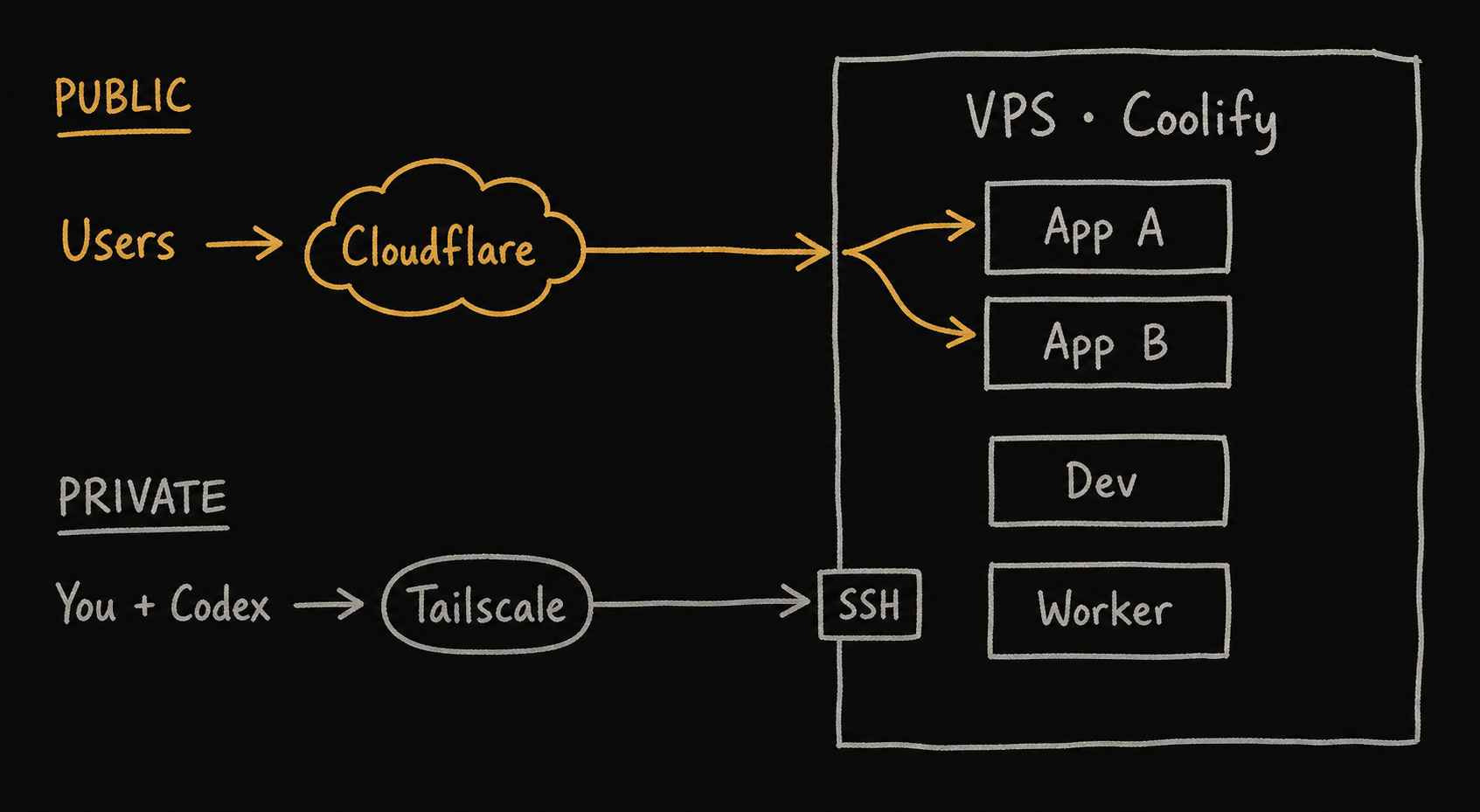
This also makes a VPS useful as an always-on remote development or agent machine. I can keep repositories and build tooling on the server, connect from a lightweight laptop, and let Codex work close to the containers it needs to test. For experiments or autonomous work, I prefer a separate development VPS rather than giving an agent broad access to the production host. It costs one more small machine, but preserves a much more important boundary.
Coolify manages the projects, Codex helps operate them, and Tailscale controls who can reach the machine. Together they make one VPS genuinely useful without pretending that self-hosting has no operational cost.
A Small Production Checklist
For most early products, my practical starting point is:
- One repository and one deployable application.
- One managed application platform chosen for team fit, not feature count.
- One managed PostgreSQL database with restricted access and tested backups.
- Cloudflare for a small, documented DNS configuration.
- Centralised application logs, error reporting, uptime checks, and basic resource alerts.
- A separate worker only when its execution lifecycle is genuinely different.
- Tailscale for private administration, development environments, and agent access.
- A written rollback and restore procedure tested before an emergency.
- Infrastructure changes tied to measured bottlenecks or explicit recovery requirements.
That architecture is not infinitely scalable. It does not need to be. It needs to be understandable, recoverable, and capable of serving the customers the company actually has.
When a boundary becomes real—a database cannot handle measured load, one process needs independent scaling, regulations demand isolation, or downtime costs more than redundancy—add the necessary weight. At that point you will know exactly which problem the complexity is buying you out of.
Add Complexity Only When It Pays for Itself
The purpose of this stack is not minimalism for its own sake. It is to reserve engineering attention for the product and its customers instead of spending it on infrastructure the company does not yet need.
Managed platforms are not perfect. Monoliths are not appropriate forever. A single database will eventually expose limits in some products. The point is to let evidence reveal those limits before designing around them.
Start with one understandable path through the system. Measure it. Add a boundary only when you can name the operational, security, or scaling problem that boundary solves. Complexity should be a purchase made with evidence, not a default generated because the tooling made it easy.